

 sales@pugh.co.uk
 01974 200 201


Adobe Express in Education: A Simpler, Smarter Way to Create
Adobe Express is rapidly becoming one of the most valuable tools for teaching, learning and communication across campuses. In our recent webinar with Meredudd Jones, Adobe’s Education Evangelist, we explored how Express empowers staff, faculty and students to create professional, engaging content quickly without needing specialist skills.
The session offered a practical look at Express in action, from its redesigned homepage to its classroom‑ready features and built‑in safety controls for younger learners. It also highlighted how Pugh can help institutions roll out Express across departments with ease.
A Fresh, User‑Friendly Adobe Express Experience
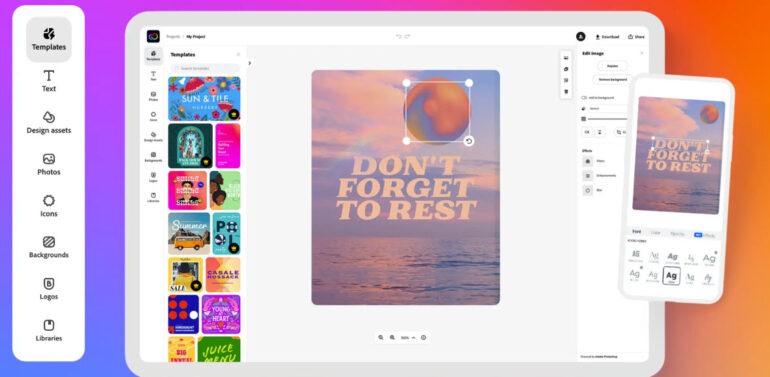
Meredudd began by walking attendees through the Adobe Express homepage, pointing out some of the changes that users might notice when they first log in. The layout has been designed to keep things simple, letting staff and students get straight to creating content without having to navigate complicated menus.
Express gives users an instant starting point, whether they want to design a poster, put together a quick video, draft a presentation, or create branded materials for school communications. Templates, fonts, colour themes and graphics are all available in a few clicks, helping educators produce polished results with minimal effort.
Creativity Made Safe and Accessible for Students
One of the biggest concerns institutions have is ensuring that students access appropriate content when using creative tools. Meredudd explained how Adobe Express manages this with built‑in filtering for K12 accounts.
Students using Express can browse images from the Adobe Stock library, but they see a filtered, age‑appropriate selection designed specifically for young learners. This gives schools confidence that pupils are exploring and creating in a safe environment.
For staff accounts, the experience is more open, giving teachers and administrators access to a wider selection of Adobe Stock images. However, the workflow remains identical quick, simple, and guided by strong guardrails that support responsible use.
Adobe Stock Integration: Quality Assets at Your Fingertips
Express includes access to Adobe Stock, allowing users to add high‑quality imagery, graphics and video clips to their work without needing additional licensing.
Meredudd clarified that while students and teachers access different subsets of the library, both groups benefit from a seamless experience within Express. Users can search directly inside the app without needing to switch platforms or navigate external sites.
For institutions, this means fewer resource bottlenecks and a more standardised creative experience across departments.
Built for Busy Staff and Non‑Creative Users
Although Express provides powerful creative capability, it is designed for speed and simplicity rather than technical complexity.
Staff can create newsletters, event posters, learning materials and social media graphics in minutes. Templates can be branded with school or college colours, making it easy to keep communications consistent across teams.
This is particularly beneficial for non‑creative departments, who often need high‑quality visual materials but don’t have the time or training to use full Creative Cloud applications such as Photoshop or Illustrator.
Support for Teachers Through Integrated Training and Resources
A recurring theme in the Q&A was training. Meredudd highlighted that Adobe provides a steady stream of upcoming sessions covering Express and wider creative tools. His team also runs regular training events that institutions can attend, ensuring staff stay confident and up‑to‑date as new features are released.
These sessions complement the resources already available within Express, including guided tutorials and in‑app tips that help users learn as they create.
How Adobe Express Supports Teaching and Learning
Express helps educators:
- Create worksheets, lesson visuals and revision materials quickly
- Build presentations and short videos for both classroom use and online learning
- Support digital literacy by giving students intuitive tools to express ideas
- Encourage project‑based learning through visual storytelling and media creation
Students benefit from a simple, safe platform that encourages creativity while supporting a range of learning styles – visual, written, and multimedia.
How Pugh Helps You Get the Most From Adobe Express
Licensing and rollout:
Our team can help you choose the right Adobe Express licensing model for your institution, ensuring the right users have access with minimal administrative overhead.
Onboarding staff and students:
We provide guidance and training options tailored to your environment, including support with template setup, branding, and account configuration.
Safe deployment for younger learners:
We’ll help you implement Adobe Express with best‑practice safety controls, making sure K12 users receive the filtered and age‑appropriate experience demonstrated by Meredudd.
Ongoing optimisation:
As Adobe continues to expand its AI‑first education tools, we’ll keep you informed and help your institution stay ahead of new features and opportunities.
Bring Adobe Express to Your Campus
Adobe Express is one of the most accessible creative tools available in education today, giving teachers and students a simple way to communicate ideas and produce professional‑quality work.
If you’re ready to explore how Express could benefit your staff and learners, our Adobe specialists at Pugh are here to help – from licensing guidance to hands‑on support with rollout and training.